> For the complete documentation index, see [llms.txt](https://wiki.holyworld.me/llms.txt). Markdown versions of documentation pages are available by appending `.md` to page URLs; this page is available as [Markdown](https://wiki.holyworld.me/prime/money/auction.md).
# Аукцион
**Аукцион** — это торговая площадка, где игроки могут покупать и продавать различные игровые предметы.
## Как открыть аукцион
Главное меню Аукциона /ah
Меню Аукциона можно открыть с помощью команды `/ah`.
## Как купить предмет
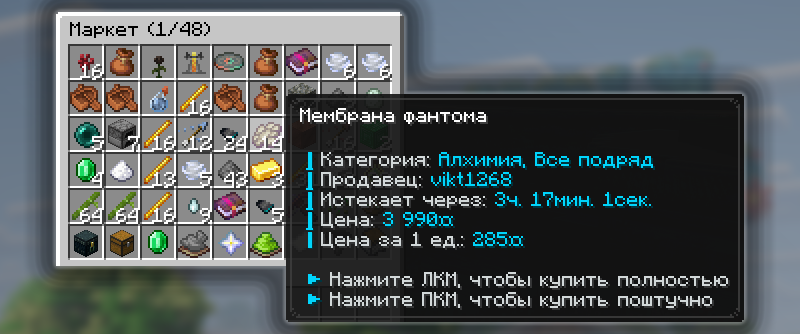
Пример, как выглядит товар на Аукционе
Чтобы приобрести предмет, выберите подходящий лот в меню Аукциона `/ah` и нажмите на его иконку. Если у вас достаточно монеток, покупка будет успешно совершена.
## Как продать предмет на аукционе
Чтобы выставить предмет на продажу, возьмите его в руку и пропишите команду `/ah sell <цена>`.
{% hint style="info" %}
Если вы хотите, чтобы ваш товар можно было приобрести только целиком, добавьте `full` в конце команды: `/ah sell <цена> full`. Такие товары отмечаются специальной строкой в описании лота.
{% endhint %}
### Как снять предмет с продажи
Чтобы убрать предмет с продажи, откройте меню Аукциона `/ah` и нажмите на иконку «Товары на продаже». В открывшемся меню будут отображаться все товары, которые вы выставили на продажу.
### Как увеличить количество слотов для продажи
Чтобы увеличить количество слотов для продажи, откройте меню Аукциона `/ah` и найдите иконку «Помощь по маркету». Здесь можно посмотреть текущее количество доступных слотов, а при наличии гемов приобрести дополнительные слоты.
{% hint style="info" %}
Минимальная стоимость одного дополнительного слота на Аукционе составляет **149 гемов**.
{% endhint %}
## Поиск нужного предмета
### Поиск по названию
Чтобы быстро найти нужный предмет на Аукционе `/ah`, воспользуйтесь командой `/ah search <название>`, указав в ней название искомого предмета.
### Поиск по игрокам
Чтобы узнать, какие предметы выставил на продажу определённый игрок, воспользуйтесь командой `/ah player <никнейм>`, указав ник нужного игрока.
---
# Agent Instructions
This documentation is published with GitBook. GitBook is the documentation platform designed so that both humans and AI agents can read, navigate, and reason over technical content effectively. Learn more at gitbook.com.
## Querying This Documentation
If you need additional information that is not directly available in this page, you can query the documentation dynamically by asking a question.
Perform an HTTP GET request on the current page URL with the `ask` query parameter, and the optional `goal` query parameter:
```
GET https://wiki.holyworld.me/prime/money/auction.md?ask=&goal=
```
`ask` is the immediate question: it should be specific, self-contained, and written in natural language.
`goal` is optional and describes the broader end goal you are ultimately trying to accomplish on behalf of the user. GitBook uses it to tailor the answer towards what is most useful for that goal.
The response will contain a direct answer to the question and relevant excerpts and sources from the documentation.
Use this mechanism when the answer is not explicitly present in the current page, you need clarification or additional context, or you want to retrieve related documentation sections.